
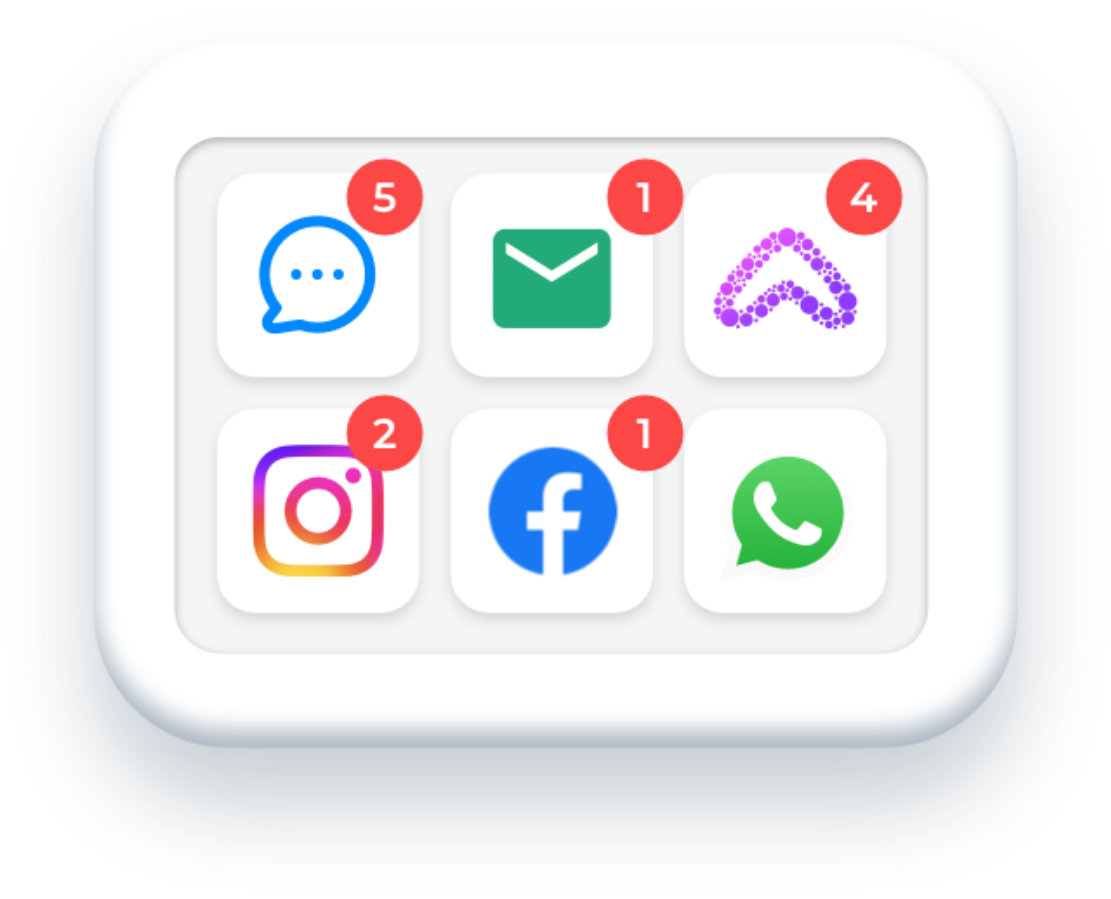
Text, email, webchat, phone, Messenger. Your team sees the full picture on every family, in one place, without switching apps.
Everything the system catches, everything it watches, every pursuit it runs. It all happens here. This is where your team works every day.
See what it replaces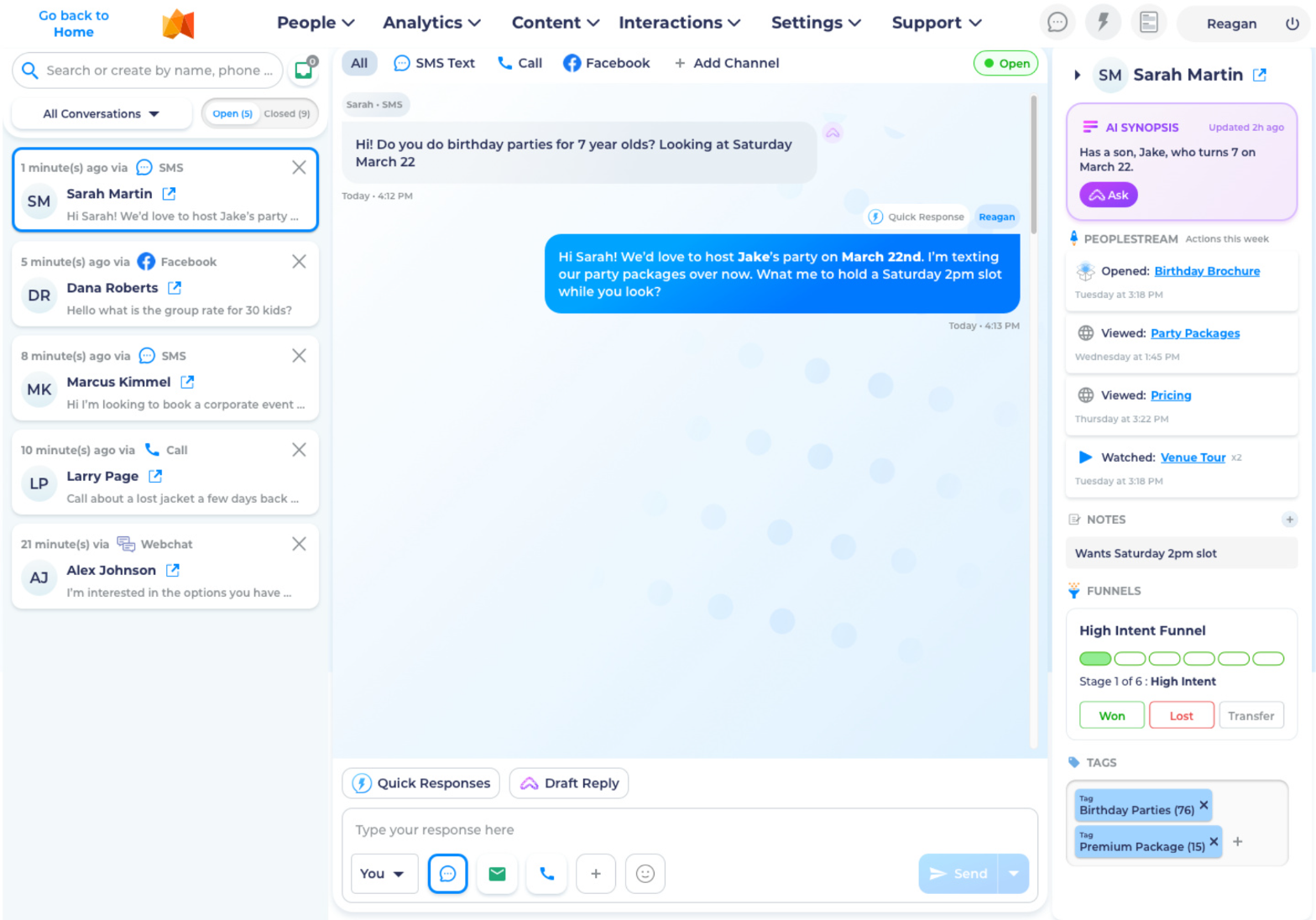
On a phone you're seeing the middle of the screen. On a desktop the inbox is three panels: conversations, the thread, the person.
Your front desk manager texts a parent from her personal phone about a birthday party. She quits in March. Every conversation she had walks out the door with her. You have no record. No history. No way to pick up where she left off.
Meanwhile, a group inquiry came in through email on Tuesday. A parent messaged on Facebook on Wednesday asking the same question. A text came in Thursday. Three channels. One family. Nobody on your team knows it's the same person.
Response times slow down because your team checks five apps throughout the day. Messages slip through during the rush. Replies feel generic because nobody has the context they need to make them personal.
The result? Parents who feel ignored choose the venue that replied faster.












It shouldn't be this hard to have a conversation with a parent who wants to give you money.
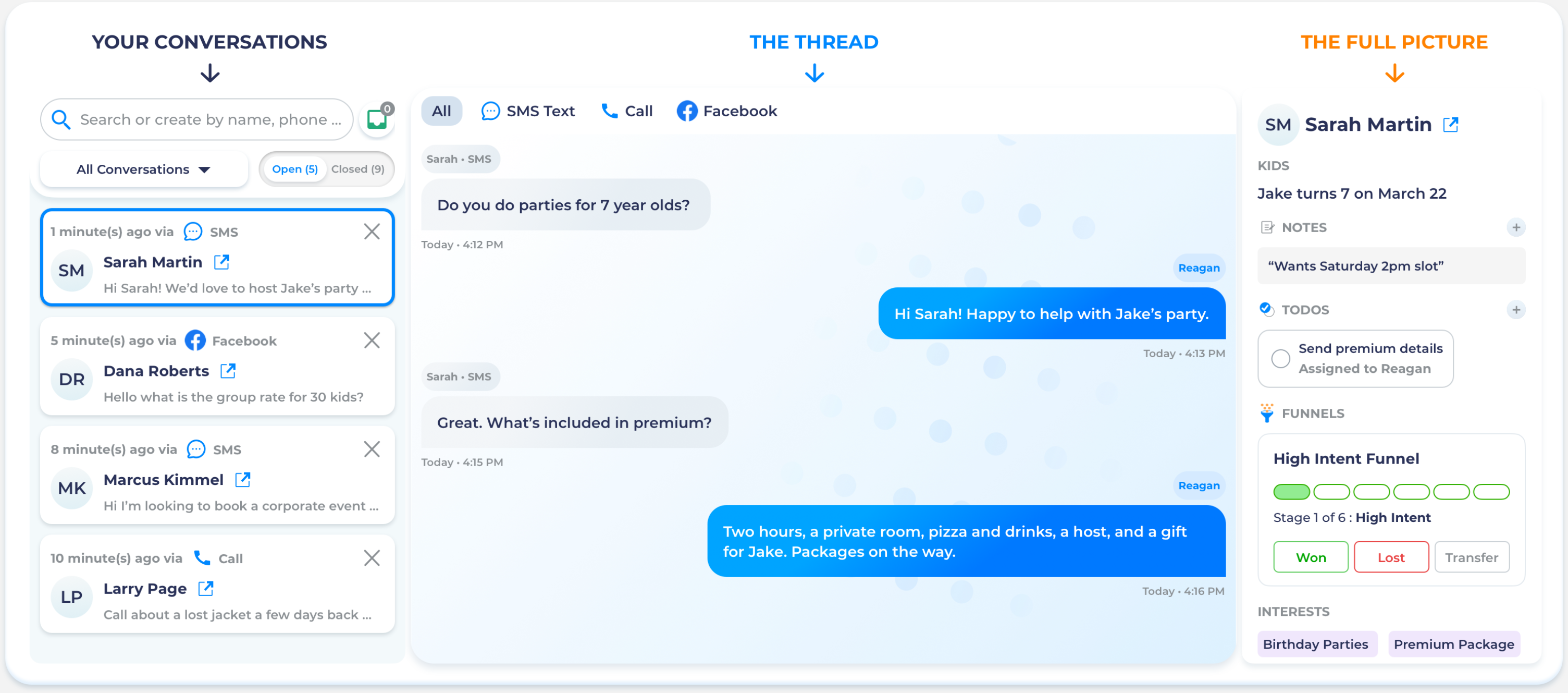
Three panels. Left: every conversation, searchable by name, number, or email. Filter by channel, by status, by who needs a reply right now.
Middle: the conversation itself. Every message between your team and this family, visible to every staff member. Nobody drops a thread because nobody owns it alone.
Right: the person. Their name. Their kids. What they're interested in. What content they opened. What they looked at on your website this week. Notes from the last conversation. To-dos assigned to staff. Funnel stage. Tags. Everything your team needs to have the right conversation without leaving this screen.
She finds you on Facebook. Your AI picks up the conversation, answers her questions, and makes an offer too good to pass up. A free game for the birthday kid, details on your party packages. She grabs it.
You text it to her phone. Now you've got a text channel. A direct line. She's not a Facebook comment anymore. She's a real person in your system with a name and a number.
Over the next few days, the system learns more. She fills out your Birthday Club form. Now you have her child's name. Jake. Turning seven on March 22nd.
Thursday, she calls the venue.
Your team picks up (or Eric does) and already knows exactly who she is. "Hey, I see that Jake's got a birthday coming up in a couple of weeks. Would you like me to put some packages together for him?"
She says yes. You send the packages to her phone on a text. She picks the Premium Package. She books.
Saturday, she walks through your doors with twelve kids and a credit card.
Facebook. Text. Form. Phone call. Text. Booking. Six steps. One family. One conversation that never broke.
One of the biggest hurdles in communicating with parents doesn't get talked about often. It's the mental bandwidth of working out what to say. Every time. For every conversation. While you're running the floor.
Quick Responses are preset messages your team fires off in one click. Personalization fields auto-populate: her name, the birthday date, the package she asked about. The message is concise, on-brand, and written to move the conversation toward a booking. Your team doesn't have to think. They just click and send.
Organize them by goal. Birthday inquiries. Group event follow-ups. FAQ answers. Event promos. Color-coded, grouped, ready. Your newest hire sends the same quality message as your best salesperson.
Write it once. Use it forever. A new staff member can be on brand within an hour of their first day on the job.
A parent lands on your website at 10 PM and opens the chat. The AI greets her, answers her questions about party packages, offers to text her the details. She gives her number. She just went from anonymous visitor to a contact in your system. Automatically.
A text comes in during Saturday's rush asking about availability. Your team is running an event. The AI responds immediately, asks the right questions ("What date? How many guests? What age?"), and keeps the conversation going until your team is free to jump in.
A parent calls after hours. Eric picks up, walks her through the options, captures her details, and sends a follow-up text.
Every one of these conversations lands in Conversation Center. When your team opens the inbox Monday morning, the AI's conversations are waiting. Full context. Full history. Ready for a human to take over or follow up.
A complaint. A payment question. A parent who just needs to talk to a person. The AI reads the moment and gets them through.
It collects the relevant details first (name, booking, issue) so your staff member walks in with context, not cold. Staff assignment is configurable: the right conversation goes to the right person. Sales question? Sales. Lost property? Operations. Upset parent? Manager.
If nobody's available, the AI gives the parent an alternative path. Contact info. Business hours. A message option. Nobody is ever left without guidance.
The right panel in every conversation shows you what this family has been doing. Not a dashboard you have to go find. Not a report you run once a week. Live data, right there, next to the conversation you're about to have.
She opened the birthday brochure on Tuesday. She viewed party packages on Wednesday. She came back to pricing on Thursday. She watched your venue tour video twice. You can see all of it. Right now. Before you send a single message.
Your reply isn't "Hey Sarah, we miss you." Your reply is "Hi Sarah. Jake's birthday is coming up March 22nd, and Saturday party slots that weekend are going fast. Want me to hold 2pm?"
That's not a template. That's a staff member who can see everything and used it.
A parent opens a pricing brochure. Her engagement rises. She shows up in your feed as someone whose interest is climbing right now. Your staff sees it, clicks the chat icon, and starts a conversation while the interest is hot.
That's the loop. Content drives engagement. Engagement surfaces in real time. Your team acts in Conversation Center. The conversation is logged. The relationship deepens. The booking happens.
Your team stops switching between apps. Your staff stops texting parents from personal phones. Your conversations stop disappearing when someone quits.
Every text, every email, every chat, every call. One inbox. Full context on every family. Quick Responses so nobody has to think. AI that handles volume when your team can't. Data that tells your staff what each family cares about before they type a word.
This is where your team works. This is where bookings happen.